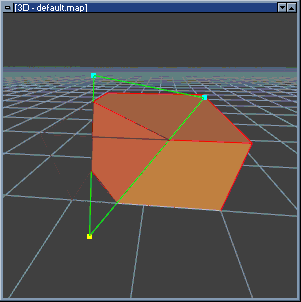
The "Clipper" is a tool used for slicing or carving brushes. After defining two or
three clip points, a carve or split operation can be performed on the current
brush selection.
Clippers carving a selected brush
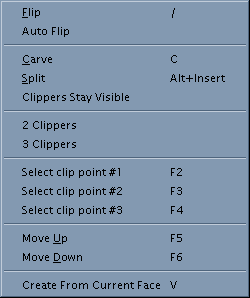
"Clippers" menu
Clipper Commands
CM_CARVE
Perform carve operation
CM_CLIP1
CM_CLIP2
CM_CLIP3
Selects clip point 1, 2, or 3.
CM_CLIPPERS_STAY
Toggle for "Clippers stay visible"
CM_CLIPPER_AUTOFLIP
Toggle for clipper "Auto flip"
CM_CLIPPER_MODE_0
Set three clipper mode.
CM_CLIPPER_MODE_1
Set two clipper mode.
CM_CLIPSPLIT
Perform split operation.
CM_CLIP_CUR_FACE
Create three clip points from the selected face.
CM_CLIP_MOVE_DOWN
Move the selected clip point down by one grid space.
CM_CLIP_MOVE_UP
Move the selected clip point up by one grid space.
CM_FLIPCLIPPER
Swap side of clipper that will be removed by carve operation.
Clipper Settings
querysplits
0 - Asks what to leave selected after split
1 - automatically leave both sides selected
2 - automatically leave left side selected
track_clippers
Redraw clipped brushes in XY views while dragging clip points
0 - Update when mouse is released, fastest
1 - Current XY view updated in real time
2 - Update all XY views in real time, slowest
undo_clipper
Allow clipper actions to be undone.
animate_clip_points
Animates clip points.
clippers_stay
Clippers will remain visible after a carve or split operation.
clipper_autoflip
When this option is set and new clip points are added, BSP will
automatically "flip" the clipper keep the half containing the center of the
selection. This means when clipping corners or small pieces from brushes, it will
usually keep the wanted side. When this option is off, the left side will be carved
by default.
clipper_mode
Clipper editing mode
0 - Use three clip points
1 - Use two clip points (axial mode).
clipper_show_outline
Show outline of carved side while editing